Most people hiring a web designer ask two questions: what does it cost, and how long does it take. Both are fair, and neither one protects you. The questions to ask a web designer before you sign are the ones about ownership, recurring fees, and what happens the day you want to leave.
This is the list I would want a local business owner to bring to me, and to the two other people they are getting quotes from. Every question below has a better answer and a worse one, and a reason the worse one costs money later.
Key Takeaways
- Most sites run on somebody else’s software: CMS-driven sites account for over 54% of websites measured in 2025, and WordPress is roughly 64% of those. The same chapter separately puts WordPress at about 35.6% of all mobile sites (HTTP Archive Web Almanac, 2025)
- A certificate costs nothing: Let’s Encrypt, a nonprofit authority, states “We do not charge a fee for our certificates” (Let’s Encrypt FAQ, accessed 2026), and 52.6% of sites used one of its certificates in 2025 (HTTP Archive Web Almanac, 2025)
- The questions that matter are not about design: who holds the domain, what recurs every year, and whether you can leave decide more than any colour choice
A note on the numbers. The Web Almanac figures come from an automated crawl of the web at large, not a survey of Ontario businesses, so treat them as the shape of the industry rather than a local benchmark. The figures from my own site are from one small site and are a worked example.
Who Owns the Website, the Domain and the Logins?
You should, all three, in writing, before any money moves. This is the question that separates a build you can walk away with from a rental you will keep paying for, and it gets asked least often.
There are four separate things people assume come bundled and often do not:
- The domain name: the address itself. It should be registered in your name, with your email as the registrant contact, in an account you can log into without asking anybody.
- The hosting account: where the files live. If it sits inside a designer’s reseller account, your site is a tenant and your invoice is a lease.
- The site files: the actual pages, images and code. Ask whether you get a copy you could hand to somebody else and have it work.
- The Google Business Profile: the listing that drives map results. If it was created under a designer’s personal Google account, you are not the one who can reply to your own reviews or change your own hours.
Control of a domain is not a soft concept, it is the technical basis for everything attached to it. Certificate authorities issue a certificate only after you “validate that you control the domain names in that certificate”, and one of the standard ways to prove that is to “prove that you control the DNS for your domain name” (Let’s Encrypt, Challenge Types, accessed 2026). Whoever holds the registrar account and the DNS holds that proof.
The profile question does similar damage, which is why Google Business Profile management should be a service you can hand to somebody else without losing the asset. A cooperating owner can transfer a profile in minutes. If they will not, you are left with Google’s own process for requesting ownership of a listing, which is slower and is not guaranteed to go your way.
The answer you want here is unglamorous: everything in your name, logins handed over at launch, no exceptions made for convenience. That is how I hand a build over, with the domain in the client’s name and the Google Business Profile too where there is one. The practical upside is that firing me would be an administrative afternoon instead of a rebuild.
What Platform Will It Be Built On, and Can You Edit It?
Ask for the platform by name, then ask exactly which parts you will be able to change yourself. A vague answer here predicts a surprise later, because “custom built” sometimes means a well-structured site and sometimes means nobody else can ever touch it.
Most sites are not bespoke, and there is nothing wrong with that. CMS-driven sites account for over 54% of websites measured in 2025, and WordPress alone powers roughly 64% of those. The same chapter separately puts WordPress at about 35.6% of all mobile sites (HTTP Archive Web Almanac, 2025).
Note which base each number uses, because “64% of the web” is a common misreading of that second figure.
Inside the WordPress world there is a second layer worth asking about. The same chapter reports that “Estimates suggest that around 60% of WordPress sites use a page builder”, with Elementor the largest (HTTP Archive Web Almanac, 2025). The source hedges that figure as an estimate, not a measurement, so treat it as a rough shape, but the practical consequence is real: a page builder is a layer you may not be able to remove later, and the chapter notes that older builders “have created long-term maintenance and lock-in issues”.
The follow-up question matters more than the platform name:
- Ask to see the editing screen: not a slide about it. Thirty seconds of watching somebody change a price tells you more than any feature list.
- Ask what happens if you stop paying: on a site builder subscription the pages usually stop being public. On a site you host, they do not.
- Ask whether the design is a template: there is nothing wrong with a template, but you should know, because it affects what you can change and what every competitor using it looks like.
- Ask who else has used this build: then open those sites on your phone. Real examples beat any portfolio page.
What Is Actually Included, and What Recurs Every Year?
Get the recurring costs written down separately from the build price, because the build price is what everybody compares and the recurring part is where quotes genuinely differ. A cheap build with four annual fees attached is not a cheap build.
Nor is this a fringe worry invented by suspicious buyers. The UK government’s own service manual tells public buyers weighing open source to account for “the total lifetime cost of ownership of the solution, including exit and transition costs” (UK Government Service Design Manual, archived guidance). That was written for public buyers spending millions, but the arithmetic is identical on a $999 build.
A quote that names only the build price has given you one of those numbers.
Here is the full list of what genuinely recurs on a small local business site:
- Domain renewal: typically well under $30 CAD a year for a
.caor.comat a mainstream registrar. Real and unavoidable. - Hosting: anywhere from free to a few hundred a year depending on the stack. A static site like this one costs almost nothing to serve.
- A TLS certificate (what most quotes still call SSL): this should be $0, and the next section explains why.
- Maintenance and updates: real work if the platform needs patching, which is why website maintenance is a line item, not a favour.
- Anything called a “licence”: ask what is being licensed and what happens to your site if you stop paying for it.
What I publish instead of a bundle is a floor: a site with local SEO setup and optimization built in starts at $999 CAD, retainers start at $300 a month, and anything with custom functionality is quoted per project. The detail on what drives a quote up or down is in the post on website design cost in Ontario.
Why Should You Question a Yearly SSL Fee?
Because the certificate itself is free, and has been for years. Let’s Encrypt is a nonprofit certificate authority, and its FAQ is unambiguous: “We do not charge a fee for our certificates. Let’s Encrypt is a nonprofit, our mission is to create a more secure and privacy-respecting Web by promoting the widespread adoption of HTTPS” (Let’s Encrypt FAQ, accessed 2026).
Nor is it a niche option. 52.6% of sites were using a Let’s Encrypt certificate in 2025, down slightly from 56% the year before as other issuers grew (HTTP Archive Web Almanac, 2025), and encryption is now the default, not an upgrade: 97.3% of mobile homepages were served over HTTPS in 2025, up from 95.6% the year before (HTTP Archive Web Almanac, 2025).
Google’s own Chrome documentation puts the expectation plainly: “All websites should be protected with HTTPS, even ones that don’t handle sensitive data” (Google, Chrome developer documentation, updated 2020). A padlock is the floor, not a feature to be sold to you.
There is one fair exception, and Let’s Encrypt names it themselves: “In some cases, integrators (e.g. hosting providers) will charge a nominal fee that reflects the administrative and management costs they incur to provide Let’s Encrypt certificates” (Let’s Encrypt FAQ, accessed 2026). A managed certificate inside a hosting plan is legitimate. A separate annual SSL licence line, charged as though the certificate were the product, is the thing to question.
Will the Site Depend on Anything Outside Your Control?
Every external thing a page loads is somebody else’s uptime, somebody else’s privacy policy, and one more thing that can break your site without you touching it. Most owners never ask, and it is one of the few technical questions you can verify yourself afterwards.
You can check any site, including one being shown to you as a portfolio example. Open the page, view source, and search the markup for http to see which other companies the page calls out to. Fonts, chat widgets, tracking pixels, review badges, booking embeds and map iframes all show up here.
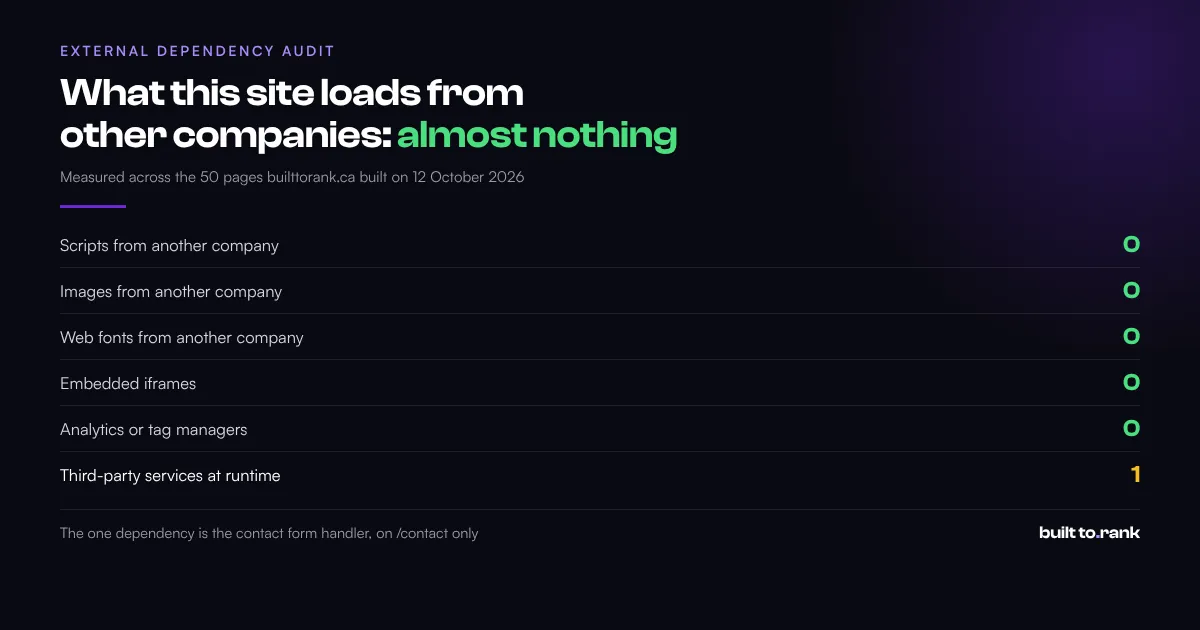
I ran that count on this site’s own October 2026 build, across the 50 public pages it produced before this post was added to it, with an internal preview page excluded. A worked example beats an assertion:
| What the built pages load | Count | Where it comes from |
|---|---|---|
| Scripts from another company | 0 | all JavaScript is served from this domain |
| Images from another company | 0 | every image is served from this domain |
| Web fonts from another company | 0 | three font files, self-hosted |
| Embedded iframes | 0 | no maps, no video embeds, no widgets |
| Analytics or tag managers | 0 | none installed, on any page |
| Third-party services at runtime | 1 | the form handler, on /contact and only that page |
The row that matters is the last one. There is exactly one external service, it processes contact form submissions, and it touches one page out of fifty. Everything else the browser needs is on the domain, so there is nothing to break when another company has an outage.
Two caveats, because a table like this is easy to overstate. The count covers what the pages load at runtime, not the links in the writing, and these blog posts link out to sources constantly. And the “no analytics” row means none are installed: the names of the common tracking scripts do appear in the source of one blog post, because one section of that post asks whether you need them.
None of this makes a third-party service bad. A booking system or a live chat may be worth exactly what it costs you in load time. The question is whether each one was a decision or an accident.
Who Writes the Words and Takes the Photos?
Assume it is you unless the quote says otherwise, because in my experience this is the most common reason a build stalls for months. Design is fast. Waiting for somebody to write the service descriptions and photograph the work is what actually holds up a launch.
- Ask who writes the copy: if it is the designer, ask to read a page they wrote for a business like yours. If it is you, ask how many words per page they need.
- Ask whether stock photos are planned: and say no to anything implying it is your crew or your finished work. The guide to shooting your own is in the post on construction website images.
- Ask what they need from you and when: a build with no content deadline is a build with no launch date.
- Ask who owns the copy afterwards: the same ownership question as everything else, and it applies to words somebody else wrote for you.
The structural version of this is what actually goes on each page, which is covered in the post on what to put on a service page. Bring that to the conversation and the quote you get back will be far more specific.
Will It Be Built for a Phone First?
Ask them to show you an existing build on your own phone, in your hand, before you sign. Not a laptop with the window dragged narrow, which is what most demonstrations actually are.
The gap between desktop and mobile is where local business sites most often fall down, and it is the easiest thing to miss if you only ever see the site on a laptop. Google’s Chrome documentation notes that “Many search engines rank pages based on how mobile-friendly they are” (Google, Chrome developer documentation, updated 2019), which is hedged in Google’s own wording and worth keeping hedged.
Two things to check while the phone is in your hand:
- The top of the page: can you tell what the business does and how to call them without scrolling?
- The tap targets: can you hit the phone number and the menu with a thumb, first time?
The measurement side of this, including which numbers are worth watching after launch, is in how to tell if your website is working. The readability side is in small business website accessibility.
What Happens After Launch, and Who Fixes It?
Get this in writing too, because “we will look after you” is not a support arrangement. You want to know what counts as a fix, what counts as new work, how fast somebody responds, and what it costs.
- Ask what is covered after launch: typo fixes and broken links usually are. A new page usually is not.
- Ask for a response time: a day is reasonable for a small business site. A week is not, if your form has stopped sending.
- Ask who holds the keys if they disappear: the ownership question again, and the one that matters most in the worst case.
- Ask what happens if you want something added in a year: an hourly rate or a quote process is fine. Silence is not.
Agree on how you will judge the result, too, because a site with no agreed measure of success gets judged on whether the owner likes the colours. Ask for two specific things at handover: access to a Search Console property for your own domain, and a form submission test you watch land in your own inbox. Both are free, and the second catches one of the most expensive failures a new site can have, which is a contact form that quietly sends nowhere.
If the site goes live and stays invisible, that is a diagnosable problem rather than a mystery. The two causes and how to tell them apart are in why your website is not showing up on Google.
What Should Make You Walk Away From a Web Designer’s Quote?
A guaranteed ranking, a domain registered in somebody else’s name, and a refusal to put the recurring costs in writing. Any one of those is enough on its own, and I have seen all three in quotes owners have asked me to look at.
- Guaranteed number one rankings: nobody controls where Google puts you, so ask exactly what is being guaranteed, how it is measured and what happens if it does not land. I do not offer one.
- The domain still in the designer’s name at handover: fine if they register it in your name on your behalf, a problem if the registrant is still them. Ask when it transfers and get the date in writing.
- No written scope: if the number of pages is not written down, the number of pages is whatever is convenient later.
- Pressure to decide today: a build is a months long relationship, and a deadline invented for the quote tells you how the rest of it will go.
- No live examples: a portfolio of designs that are not live anywhere is a portfolio that was never tested on a customer.
The two builds I point people at are real and live, so you can judge the work instead of a mockup: a roughly 40 page site for a commercial refrigeration supplier with a 3D walk-in cooler configurator (World Food Equipment), and a municipal campaign site with an interactive ward map (Dev Vashi). Both are on the proof page with what was actually built.
Frequently Asked Questions
What questions should I ask a web designer before hiring them?
Start with ownership, recurring cost and exit. Ask who the domain will be registered to, what the site is built on and which parts you can edit yourself, which costs recur every year, who holds the logins at launch, and what happens if you want to leave. Design and price come after those, because a good looking site you do not own is a worse outcome than a plain one you do.
Who should own my business domain name?
You should, registered in your business name with your own email as the contact, in an account you can log into. It is normal for a designer to set the registration up for you and entirely reasonable to ask them to, but the registrant should be you from day one. Whoever controls the domain and its DNS controls the site, which is not a position you want to discover you are in during a disagreement.
Should I have to pay a yearly fee for an SSL certificate?
In almost every case, no. Let’s Encrypt is a nonprofit certificate authority whose own FAQ states that it does not charge a fee for its certificates, and 52.6% of sites were using one of its certificates in 2025. A managed certificate inside a hosting plan is reasonable, because Let’s Encrypt notes that hosting providers sometimes charge a nominal fee for the administrative work, but a separate annual licence fee for the certificate itself is worth questioning.
Can I take my website with me if I change web designers?
That depends entirely on how it was built and what you agreed, which is why it is a question to ask before the build rather than during the argument. A site you host, on a domain you own, with the files in your possession, moves with you. A site inside somebody else’s platform account or subscription usually does not, and the pages often stop being public when the payments stop.
How much should a small business website cost in Ontario?
From the quotes I have written and the ones Ontario owners have brought me to compare, most small local businesses land between roughly $1,000 and $2,500 CAD for the build, and my own floor is $999 for a site with local SEO setup and optimization included. What matters more than that number is what recurs after it, because an annual stack of hosting, licence and maintenance fees can quietly exceed the build price within a couple of years.
Do I need to understand the technical side to ask good questions?
No, and you should be wary of anybody who implies you do. Every question on this page is answerable in plain English, and the answers you want are mostly boring: your name on the domain, your logins, a named platform, written recurring costs. If a question gets answered with jargon instead of an answer, that is itself the answer.
Wrapping Up
The questions to ask a web designer are about ownership more than design, because design is the part everybody already compares. Two quotes for the same site can look identical on page one and differ by thousands over three years, once the recurring fees and the lock-in are counted.
You do not need to become technical to protect yourself here. You need your name on the domain, your logins in your own inbox, the recurring costs written down, and a plain answer to what happens when you leave.
If you want a second opinion on a quote you are holding, get a free website audit from Built to Rank. I will look at what you are being charged for, what recurs, who owns what, and what your current site is actually doing in search, whether you are in Peel Region, the wider GTA, or anywhere in Canada.
Further reading: