Construction website images do two jobs at once. They are the proof a homeowner uses to decide whether you can actually do the work, and they are almost always the heaviest thing on the page. Get them right and someone scrolls, believes you, and calls.
Get them wrong and your site either looks like every other contractor site in the GTA or loads so slowly that nobody waits around to judge it. This guide covers which photos a construction company website needs, how to shoot them on a phone, what to size them at, and how to get them found in Google.
Key Takeaways
- An image is the largest thing the browser paints on 76% of mobile pages and 85.3% of desktop pages (HTTP Archive Web Almanac, 2025)
- Images account for more bytes than any other resource type, at a median of 911 KB on a mobile home page (HTTP Archive Web Almanac, 2025)
- Only 11% of pages serve their main image as WebP, while 57% are still on JPG (HTTP Archive Web Almanac, 2025)
- Photos of your own finished jobs are the one asset on your site a competitor cannot buy a copy of
What Makes a Good Construction Website Image?
A good construction website image shows real work, in enough detail that a homeowner can tell what was involved, and loads fast enough that they see it before they lose patience. Everything else is filler. The test is simple: could a competitor have taken this photo too?
For scale, the median mobile page on the web carries 13 images (HTTP Archive Web Almanac, 2024). A construction site with a proper gallery will carry several times that, which is exactly why the quality bar and the file sizes both matter.
Four things separate a photo that sells work from one that fills space:
- It is your job: your crew, your equipment, your finished site, not a licensed image of someone else’s.
- It shows scale or difficulty: a trench with a person or machine in frame reads as real work; a close crop of dirt reads as nothing.
- It is sharp and bright: shot in daylight, in focus, taken standing still rather than walking past.
- It is sized for the web: a few hundred kilobytes, not the 6 MB file straight off the phone.
Should a Construction Company Use Stock Photos or Real Job Site Photos?
Real job site photos, in nearly every case. Stock has one honest use on a construction site: abstract backgrounds and textures where nobody could reasonably think it is your work. The moment a stock image implies your crew or your project, it stops being decoration and starts being a claim you cannot back.
The practical problem with stock is exclusivity, or the lack of it. That polished excavator photo is licensed to every contractor who bought it, so a homeowner comparing three local companies can meet the same picture three times in ten minutes. Nothing kills trust faster than being caught borrowing someone else’s job.
There is a lower-stakes version of the same mistake: photos of work that is real but not yours, pulled from a supplier catalogue or a manufacturer’s site. Same problem, same outcome. If you have not finished enough jobs to fill a gallery yet, show fewer photos rather than borrowed ones.

Which Photos Does a Construction Website Actually Need?
Most construction companies need somewhere between 20 and 40 images, not hundreds. The goal is coverage of every service you sell plus enough finished work to make the range obvious. Here is the shot list I work from on a build:
- One hero image: your strongest finished project or a machine mid-work, wide enough to hold a headline over it.
- One photo per service: excavation, demolition, grading, concrete, whatever your service pages list, each with its own real image.
- Before and after pairs: the single most persuasive format in construction, because it shows the problem you solve and not just the outcome.
- Your crew working: faces and hi-vis on a real site do more for trust than any badge graphic.
- Branded trucks and equipment: a truck with your name on it reads as an established company rather than a guy with a phone number.
- Detail shots: clean edges, proper backfill, finished grade. This is where a homeowner who has been burned before decides you are careful.
- One photo of you: local buyers hire people, and a single honest photo of the owner outperforms a stock handshake every time.
That set covers a homepage, five or six service pages, and a gallery. It is also the exact material your Google Business Profile needs, so one shooting habit feeds both.
How Do You Take Job Site Photos That Work on a Website?
Shoot on a recent phone, in daylight, standing still. Modern phone cameras produce images far sharper than a website ever needs, so the limiting factor is almost never the camera. It is light, framing, and remembering to take the photo before the site gets cleaned up and the crew leaves.
A few habits that make the difference, in the order they come up on a job:
- Shoot every job, every time: build it into the end of the day the way you build in loading the truck. You cannot go back for the before shot.
- Use morning or late afternoon light: midday sun blows out concrete and buries detail in hard shadow.
- Get the whole thing in frame: step back further than feels necessary, then take a second closer shot for detail.
- Hold the phone horizontally: website heroes and galleries are wide, and a vertical photo has to be cropped to fit, usually badly.
- Take five, keep one: the cost of extra shots is zero and the odds of one being sharp go way up.
- Ask before photographing a home: a quick text asking the owner if you can use photos of their project saves a bad conversation later.
Why Are Images the Slowest Part of a Construction Website?
Because construction website images are the heaviest thing on the page, and the photo is what the visitor is waiting on. An image is the largest element the browser paints on 76% of mobile pages and 85.3% of desktop pages (HTTP Archive Web Almanac, 2025). On most construction sites, your hero photo effectively is your load time.
The numbers on how much sites ship are worse than most owners expect. Images account for more bytes than any other resource type, at a median of 911 KB per mobile home page, and the median page grew 7.8% year over year to about 2.7 MB (HTTP Archive Web Almanac, 2025). At the heavy end it gets ugly: desktop home pages at the 90th percentile ship 6,856 KB of images alone (HTTP Archive Web Almanac, 2025).
This is not a rare problem. Only 48% of mobile sites passed Google’s Core Web Vitals thresholds in 2025, up from 44% in 2024 and 36% in 2023 (HTTP Archive Web Almanac, 2025). Around 68% of images on the web have no loading attribute set at all, meaning nothing tells the browser which photos can wait (HTTP Archive Web Almanac, 2025).
The fix on a construction site is unglamorous and cheap. Compress every photo before it goes up, let the hero load first, and lazy-load everything below the fold so the gallery does not compete with the content someone is actually reading.
What Size and Format Should Construction Website Images Be?
WebP for photographs, SVG for logos, sized to the largest spot the image will ever occupy and no larger. WebP holds the same visual quality as JPEG at a noticeably smaller file size, yet only 11% of pages serve their main image as WebP while 57% are still on JPG (HTTP Archive Web Almanac, 2025). That gap is free ground against most competitors.
These are the specs I ship on a construction build:
| Where it appears | Dimensions | Format | Target file size |
|---|---|---|---|
| Homepage hero | 1920 x 1080 | WebP | Under 200 KB |
| Service page banner | 1600 x 900 | WebP | Under 150 KB |
| Gallery thumbnail | 800 x 600 | WebP | Under 60 KB |
| Gallery full size | 1600 x 1200 | WebP | Under 250 KB |
| Crew or equipment shot | 1200 x 800 | WebP | Under 120 KB |
| Logo or mark | Any | SVG | Under 30 KB |
Four rules that travel with that table
- Compress before you upload: Squoosh and TinyPNG both run in a browser with nothing to install, and either will take a 6 MB phone photo down to a few hundred kilobytes.
- Export at 80% quality: the difference above that is invisible on a phone and expensive in bytes.
- Set width and height: only 32% of images on mobile pages set both (HTTP Archive Web Almanac, 2024), and MDN notes they are “especially important for lazy-loaded” images because they stop the page jumping while it loads (MDN).
- Keep the originals off-site: you will want the full-resolution files for print, truck wraps, and your Google profile.
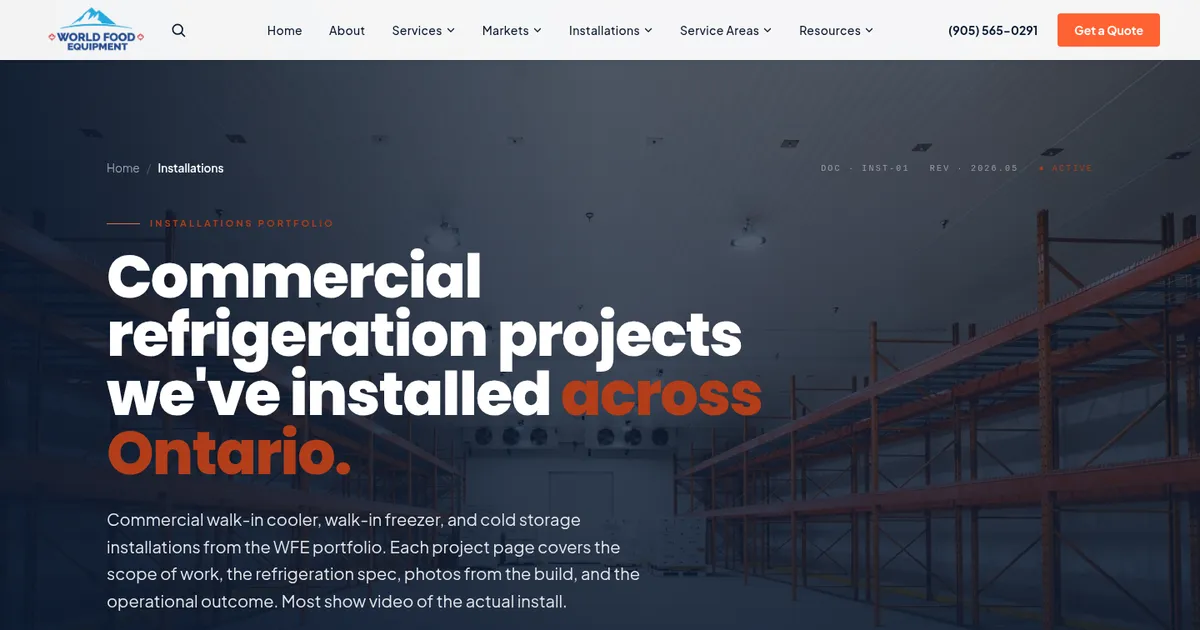
Occasionally photography is not the right tool at all. On the World Food Equipment build, a Mississauga commercial refrigeration supplier in business since 1995, no set of photos could show every configuration of a walk-in cooler, so I built a 3D configurator instead and let the customer turn the product themselves. The installations section of that same site is a straight project portfolio, built on photos from the actual builds.
How Do You Get Construction Website Images Found in Google?
Name the file, describe the image, and put it near text about the same thing. Search engines cannot see a photo, so everything they know about your excavation shot comes from the file name, the alt text, and the words around it. Most sites do this badly, which is the opportunity.
The state of alt text on the web is genuinely poor. At the median, only 60% of images on mobile pages carry an alt attribute at all, and roughly 15% of all images carry one that is blank (HTTP Archive Web Almanac, 2025). A separate measure the same year found that roughly 8.5% of alt text ends in a file extension like .jpg, meaning the file name was dumped in as the description, and that about half of all images carry either an empty alt or fewer than 10 characters of text (HTTP Archive Web Almanac, 2025).
Doing it properly takes about thirty seconds per photo:
- Rename before uploading:
basement-excavation-brampton.webptells a search engine something;IMG_4821.JPGtells it nothing. - Write alt text as a sentence: describe what is in the frame, name the type of work, add the area when it actually applies. MDN puts the rule plainly: alt text “should not describe the presence of the image itself or the file name of the image” (MDN).
- Skip the keyword stuffing: repeating “excavation contractor Brampton” in nine alt tags reads as spam to Google and as nothing at all to a screen reader.
- Caption the gallery: one line about what the job involved gives both the visitor and the search engine context the photo alone cannot carry.
- Put photos beside matching text: an excavation photo belongs on the excavation service page, not scattered across the site as decoration.
Images are also one of the few places where the same work pays off twice. The photos you optimize for construction company website design are the ones you upload to your Google Business Profile, and an active profile with real job photos is part of how you show up in the map pack.
Frequently Asked Questions
How many photos should a construction website have?
Between 20 and 40 for a typical small construction company, spread across the homepage, each service page, and a gallery. That is enough to show range without turning the site into a slideshow nobody scrolls through. Quality matters far more than count: eight sharp photos of finished local work beat forty blurry ones taken from a truck window.
Can I use stock photos on my construction website?
For backgrounds, textures, and abstract detail shots, yes. For anything that implies it is your crew, your equipment, or your finished job, no. The same stock excavator is licensed to every other contractor who bought it, so a homeowner comparing three local sites can see the identical photo three times, and that is the moment they stop believing any of you.
What file format is best for construction website images?
WebP for photographs, SVG for logos and icons. WebP holds the same visual quality as JPEG at a much smaller file size, which matters because photos are the heaviest thing on a construction site’s pages. Only 11% of pages currently serve their main image as WebP while 57% still use JPG (HTTP Archive Web Almanac, 2025), so switching is a cheap way to load faster than most competitors.
Do I need a professional photographer for my construction website?
Not to start. A recent phone camera in good daylight produces web images that are more than sharp enough, and the discipline of shooting every finished job matters more than the gear. Hiring a photographer for half a day is worth it later, once you know which three or four projects you want to lead with.
What should I write in the alt text for construction photos?
Describe what is actually in the photo, in a full sentence, including the type of work and the area if it is relevant. Something like: excavator digging a basement foundation on a Brampton job site. Skip keyword stuffing and never leave the file name in there, which is what roughly 8.5% of alt text on the web amounts to (HTTP Archive Web Almanac, 2025).
Can I use the same photos on my website and my Google Business Profile?
Yes, and you should. Using the same real project photos in both places makes your business look consistent to anyone checking you out from a Google search. Upload the full-size original to your profile rather than the compressed copy from your website, because Google recompresses images itself and you want it working from the better source.
Wrapping Up
The photo problem on most construction websites is not artistic. It is that nobody took the pictures, so the site got filled with stock, and the few real photos that made it up went online at full camera size and slowed everything down.
Both halves are fixable this week. Start shooting every finished job on your phone before the crew packs up, then compress what you have and give each image a real file name and a real description. Treating construction website images as part of the build rather than an afterthought puts you ahead of most contractor sites in the GTA.
If you want the imagery handled properly as part of the build, get a free website audit from Built to Rank. I will look at what your current images weigh, how they are named, what your gallery is doing to your load time, and send back the specific fixes, whether you are in Peel Region, the wider GTA, or anywhere in Canada.
Further reading: