Most local business owners check whether their website is working by looking at it. That tells you nothing. Here is how to tell if your website is working using free tools and real numbers, starting with the full search export for this very site: 440 impressions and 15 clicks over 68 days.
Those are my numbers, not a client’s, and they are not flattering. Publishing them is the point.
Key Takeaways
- Half the web is measured by the same two scripts: Google Analytics appears on 53% of webpages and Facebook Pixel on 16%, and the
_gacookie alone is set on 46% of webpages (HTTP Archive Web Almanac, 2025)- Most sites still miss the speed bar: 48% of mobile websites and 56% of desktop websites had good Core Web Vitals in 2025, up from 44% and 55% a year earlier (HTTP Archive Web Almanac, 2025)
- Position on its own is not a result: 17 different searches put this site at average position 1 over that window and produced 26 impressions and zero clicks between them.
A note on the numbers below. The Web Almanac figures come from a crawl of the web at large, not from a sample of Ontario local businesses. The Search Console figures are from one small, young site, exported on August 10, 2026 and committed to this repository, so they are a worked example rather than a benchmark.
What Does a Website That Works Actually Do?
A website works when it turns a stranger into a phone call, a form submission or a visit. Everything else on the dashboard is a proxy for that, and a proxy can move in the wrong direction while the thing you care about stays flat. Start from the outcome and work backwards.
For a local business the outcome list is short:
- A phone call you can attribute: somebody taps the number on the site instead of finding you through a friend, which you can see in call logs or in your Google Business Profile.
- A form that actually arrives: an enquiry that lands in an inbox you read, from somebody describing a job you want.
- A direction request: on a Google Business Profile this is the clearest buying signal a local business gets.
- A better quality of enquiry: fewer price shoppers and more people who already read the page and know the range.
- A search you now appear for: being shown at all for a job you want is the first step, and it happens before any click does.
Notice what is missing from that list. Visits are not on it, and neither is any number that goes up when your own staff open the site.
Which Website Numbers Should You Ignore?
Ignore any number that can rise while your phone stays silent. Most of the metrics that get reported to small business owners are in that category, which is exactly why they get reported. They are easy to make look good.
| The number | What it looks like it says | What it actually says |
|---|---|---|
| Pageviews | People are interested | Something loaded, possibly a bot, possibly you |
| Time on page | People are reading | A tab was left open, or somebody could not find the phone number |
| Bounce rate | People left unhappy | Somebody got the answer and called you, which counts as a bounce |
| Keyword rankings with no volume | You are winning | You rank for something nobody searches |
| Social followers | You are known locally | Follower counts do not appear in any buying decision |
| Impressions with no clicks | You are visible | You are being shown too low, or to the wrong search |
None of these are lies. They are just answers to questions you did not ask. A report built entirely out of them is a report designed not to be checked.
Ask anyone reporting on your local SEO for the query list and the impression counts instead. Those two columns are hard to dress up, because they say what you were shown for and how often.
What Does Google Search Console Tell You That Nothing Else Can?
Search Console is the only place you can see what people typed before they saw you. Analytics tools start measuring after the click, so they cannot see the searches you appeared for and lost. Search Console sits on the other side of that gap, it is free, and it belongs to you rather than to your agency.
Four numbers do the work:
- Impressions: how many times a page of yours was shown in results for a search. This is your ceiling.
- Clicks: how many of those turned into a visit. Impressions without clicks means you are being shown and skipped.
- Average position: where you sat, averaged across every impression. On its own it is the most misread number in the tool.
- Query: the actual words somebody typed, which is the part you cannot reach by guessing at a keyword list.
Set it up once and it starts collecting. If your site is not in it yet, that is also the first thing to fix when your website is not showing up on Google at all.
What Do the Numbers Look Like on a Small Local Business Site?
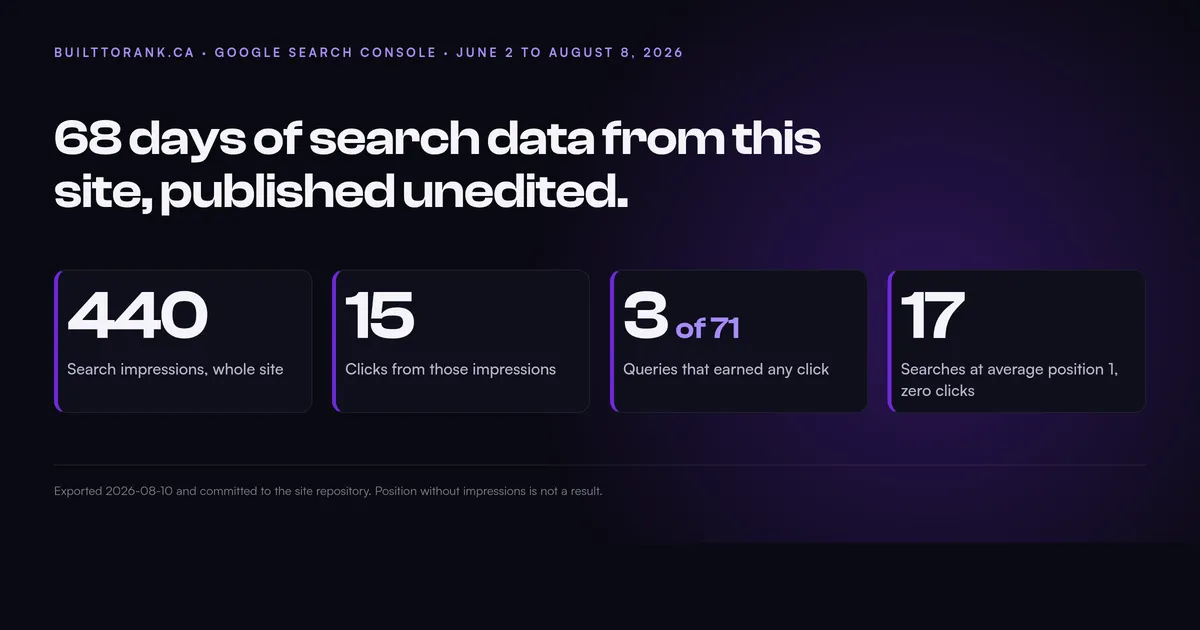
Small. Here is the entire Search Console export for builttorank.ca covering June 2 to August 8, 2026, which is 68 days. The daily figures total 440 impressions and 15 clicks for the whole site, every page, every search.
Six of the thirteen pages in that export look like this:
| Page | Impressions | Clicks | Average position |
|---|---|---|---|
| Homepage | 245 | 15 | 14.21 |
| /web-design-for-contractors | 169 | 0 | 81.33 |
| /contact | 30 | 0 | 33.57 |
| /about | 11 | 1 | 6.82 |
| /codex (a retired page) | 10 | 0 | 11.70 |
| /blog | 9 | 0 | 3.56 |
Add those six rows up and they already pass 440 impressions between them. That is not a mistake in the table, and the reason is the last thing in this section.
Three details in that table are worth more than the totals. A retired page that now redirects is still being shown 10 times at position 11.7, which is the kind of thing you only find by reading the page list.
The blog index sits at average position 3.56 and earns nothing, because nine impressions rarely produce one. And one page took 169 impressions, second only to the homepage, while producing nothing at all.
The device split says something too:
| Device | Impressions | Clicks | CTR | Average position |
|---|---|---|---|---|
| Desktop | 397 | 10 | 2.52% | 44.78 |
| Mobile | 43 | 5 | 11.63% | 16.49 |
Mobile was shown roughly nine times less often, at a far better average position of 16.5 against 44.8, and converted more than four times better. The reading that fits is that the desktop impressions are mostly deep-page appearances nobody was ever going to click, and the mobile ones are the real audience.
The lesson is not “mobile is better”, it is that an average across both devices would have hidden both facts. Comparing two pages against each other instead of the site against itself is the same trick applied one level down, which is how you tell whether your city pages are working.
There is one more number in there worth saying out loud. Of those 15 clicks, 7 came from people searching the words “built to rank”, which is somebody who already knows the name typing it into Google. That leaves at most 8 clicks in 68 days from somebody who did not already know the name, and Google will only name the query behind 2 of them.
One more thing that export teaches, and it is the detail nobody puts in a client report. The same download disagrees with itself three ways.
The daily figures total 440 impressions and 15 clicks. The page report lists 518 impressions and 16 clicks across 13 pages. The query report accounts for 366 impressions and 9 clicks across 71 rows.
None of that is an error. Google does not list every query or attribute every impression to a row, so the rows never add up to the totals. Any report that hands you a perfectly reconciled set of Search Console numbers was not built from Search Console.
Can You Rank Number One and Still Get Nothing?
Yes, easily, and this site is the proof. In that same 68-day export, 17 separate searches show an average position of exactly 1. Between them they produced 26 impressions and zero clicks.
They look like this: “wordpress expert near me” at 2 impressions, “local business near me without websites” at 1, “website designer near me” at 1. Position 1 on a search that happens once is worth precisely nothing, and a rank report that lists those 17 terms as first-place finishes is technically accurate and completely useless.
The opposite failure is on the same site at the same time:
| Failure shape | What the export shows | What it means |
|---|---|---|
| Rank with no demand | Position 1, one or two impressions | Nobody is searching this phrase |
| Demand with no rank | 169 impressions, position 81, zero clicks | The right search, the wrong page position |
| Demand and rank, no click | Shown high, still skipped | The title and description are not earning the click |
That middle row is /web-design-for-contractors, the second most-shown page on the site and the most-shown page that has never earned a click. It sits around position 81, which puts it on page nine of the results for a search people genuinely make.
No amount of on-page work matters until that gap closes, and knowing that is worth more than any visit count. It is also why a service page has to earn its keyword before you write it.
The bottom row is the one most people can actually fix this week. Google’s own Lighthouse audit states that “meta descriptions may be included in search results to concisely summarize page content” (Google Lighthouse source, accessed 2026), so on a page that is being shown and skipped, the title and description are the two things standing between an impression and a click.
Do You Need Google Analytics on a Local Business Website?
Not automatically. Google Analytics is the most common tracking technology on the web, appearing on 53% of webpages, with Facebook Pixel second at 16% (HTTP Archive Web Almanac, 2025). Common is not the same as necessary, and installing it has a cost most owners never price in.
The cost side is real:
- It sets cookies: the
_gacookie is set on 46% of webpages and_gidon 18% (HTTP Archive Web Almanac, 2025), and cookies are what drags a consent banner onto your site. - It adds requests: the median page already loads 83 third-party requests on desktop and 79 on mobile (HTTP Archive Web Almanac, 2025), and every tag you add is more of them.
- It answers a question you may not have: analytics tells you what happened after the click, which matters most when you are paying for the click.
There is no Google Analytics on this site and no tag manager, and neither appears anywhere in the source of any page. The search side comes from Search Console, visit counts come from the host’s own edge analytics, and the only conversion that gets counted is a form submission landing in an inbox.
Measuring a visit does not have to mean loading a tagging platform. The browser has a purpose-built method for it: navigator.sendBeacon() is described by its own documentation as “intended for analytics and diagnostics code to send data to a server”, with a payload capped at about 64 KiB (MDN, accessed 2026). Lightweight counting is a solved problem, and the heavyweight tag is a product decision rather than a technical requirement.
Running no tag at all is a deliberate choice for a site whose job is producing enquiries, and it is the wrong choice the moment you start paying for traffic. If you are running Google Ads or Meta Ads, you need conversion tracking, and then a tag earns its place. Choose it because you have a question, not because a template shipped with it.
How Do You Know Your Measurement Is Not Broken?
Assume it is broken until you have watched it work. Tracking fails silently, a tag that never loads reports zero, and zero on a dashboard looks identical to nobody visiting. This site got caught by exactly that.
On September 26, 2026, a commit to this repository added two hosts to the Content Security Policy in public/_headers. The commit message reads: “script-src + static.cloudflareinsights.com (beacon script), connect-src + cloudflareinsights.com (beacon reports). The beacon has been blocked on every page load until now.”
The analytics were installed, the dashboard existed, and the browser had been refusing to load the script on every single visit. That fix landed two days before this post went up.
Five checks that take about fifteen minutes:
- Submit your own form: from a phone, on cellular data, not on the office wifi, and confirm the email lands in the inbox somebody actually reads. This is the single most common silent failure on a local business site.
- Open the browser console: load your own homepage, open developer tools, and look for blocked or failed requests in red.
- Check you verified the right property: a Search Console property for
www.yoursite.cawill show nothing if your site serves fromyoursite.ca. - Call your own number from the site: tap the phone link on a real phone and make sure it dials the number you expect.
- Look for the tag in the page source: view source and search for the tracking script. If it is not in the HTML, it is not running.
How Often Should You Check, and What Should You Change?
Monthly for search data, immediately after any change to the site, and never in response to a single week. On a base of 15 clicks, a swing of three looks like a 20% collapse and means nothing at all. Compare a month against the same month a year earlier, because local demand is seasonal and your data is not big enough to smooth that out.
There is one set of numbers worth watching more mechanically, because they have fixed pass marks. The Core Web Vitals thresholds are published in Google’s own web-vitals library: good is 2,500 ms or less for Largest Contentful Paint, 200 ms or less for Interaction to Next Paint, and 0.1 or less for Cumulative Layout Shift (GoogleChrome/web-vitals, accessed 2026). Most sites do not clear all three: 48% of mobile websites and 56% of desktop websites managed it in 2025 (HTTP Archive Web Almanac, 2025).
The first of those three is the one worth understanding, because the specification behind it says the largest paint during loading “is likely to signify a meaningful event from the user’s perspective” (W3C Largest Contentful Paint, accessed 2026). In plain terms it is the moment your visitor sees the thing they came for.
A workable monthly rhythm for a small local business:
- Read the query list, not the totals: the queries tell you what Google thinks you are for, which is often not what you think you are for.
- Find your highest-impression page with no clicks: that one page is your biggest single opportunity every month.
- Check the pages nobody is being shown at all: zero impressions after three months usually means the page has no search behind it.
- Count real enquiries by hand: for most local businesses a paper tally of calls and forms beats any dashboard.
- Change one thing: a title tag, a headline, an added section, then leave it a month before judging it.
That last one matters more than the tooling. Sites that do not improve are usually not under-measured, they are just never changed. If you want a second pair of eyes on which single change is worth making first, that is what ongoing SEO and site care is for.
Frequently Asked Questions
What is a good number of website visitors for a small business?
There is no universal number, because a plumber who gets eight enquiries a month from forty visits is doing better than a shop with four thousand visits and no calls. Judge the site on enquiries first and on search impressions second. Visit counts on their own tell you almost nothing about whether the site earns anything.
Is Google Search Console free?
Yes, it is free for any site you can verify ownership of, and it is the only place you can see the searches your pages appeared for. It shows impressions, clicks, average position and the query itself. A paid rank tracker can only report on the phrases you thought to hand it, which means it can never show you the search you did not know you were appearing for.
Why does my website rank number one but get no traffic?
Almost always because nobody is searching that phrase. Average position and search volume are two different things, and a page can hold position one on a term that gets shown a handful of times a year. Check the impression count next to the position before you celebrate it.
Do I need Google Analytics on a small business website?
Not always. If your website exists to produce calls and form enquiries, Search Console plus a working form notification covers most of what you need to know. Analytics earns its place once you are paying for ads and need to see which spend produced which enquiry.
How often should I check my website numbers?
Once a month for search data, and straight after any change to the site. Weekly checks on a small local site mostly measure noise, because a swing of three clicks looks dramatic on a base of fifteen. Compare a month against the same month last year rather than against last week.
How do I know if my website tracking is broken?
Submit your own contact form from a phone on cellular data and confirm the email arrives, then open your site in a browser and look at the console for blocked requests. Tracking fails silently far more often than owners expect. A tag that never loads reports zero, and zero looks exactly like no traffic.
Wrapping Up
A website is working when it produces enquiries you would not otherwise have had. Every other number is there to explain why that figure is what it is, and most of them are better at flattering a report than at explaining anything.
The fastest way to find out is to open Search Console, read the query list rather than the totals, and find the one page being shown often and clicked never. On this site that page is obvious and it has been obvious for months. Knowing which page it is beats not knowing, even when the number attached to it is 15.
If you would rather have someone read the export with you, get a free website audit and you will get a plain answer about what your own numbers say, whether or not you hire anyone afterwards.
Further reading: